EN     ES


C�mo usar Voipraider con su dispositivo SIP

Necesita un nombre de usuario y una clave Voipraider para poder realizar llamadas a trav�s de nuestra red. As� que primero deber� suscribirse a Voipraider descargando e instalando la aplicaci�n y creando su inicio de sesi�n.

Puede usar Voipraider con los siguientes tipos de dispositivos Sip:
ATA SIP (adaptador telef�nico anal�gico)
Router SIP
M�dem xDSL

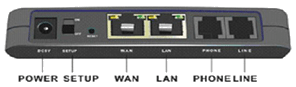
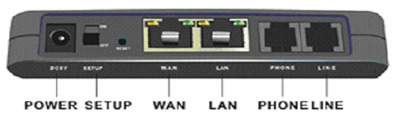
La mayor�a de dispositivos disponen de una combinaci�n de los siguientes puertos.

Ejemplo 1

(�sta es s�lo una disposici�n de ejemplo; cada tipo de dispositivo puede ser distinto)

Ejemplo 2

(�sta es s�lo una disposici�n de ejemplo; cada tipo de dispositivo puede ser distinto)

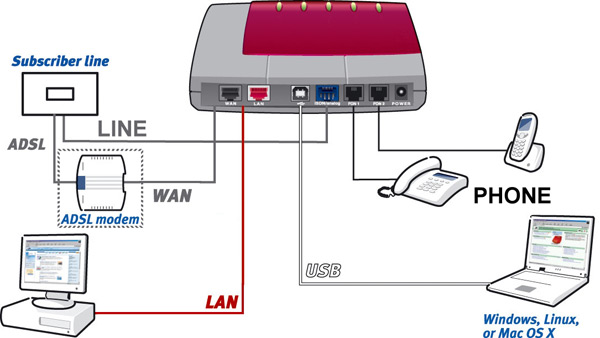
(A)DSL: conecte la l�nea de su proveedor de (A)DSL (no disponible en un ATA).
WAN: conecte la l�nea de su m�dem/router xDSL .
LAN: puerto para su red (dom�stica); p. ej., puede conectar su PC, port�til, impresora de red o router inal�mbrico.
TEL�FONO: aqu� puede conectar su tel�fono anal�gico.
LINE: conecte su l�nea de tel�fono anal�gica (RTPC).
USB: puede conectar un PC o port�til con un puerto USB libre.

Algunos dispositivos SIP tienen m�s de un puerto LAN y/o puerto de TEL�FONO disponibles.

Para las conexiones de hardware de su dispositivo SIP consulte la informaci�n anterior y su manual de usuario.
Despu�s de conectar el hardware debe comprobar que su software est� instalado y configurado correctamente.

Configuraci�n del software

General

Puerto SIP: 5060
Registro: sip.Voipraider.com
Servidor proxy: sip.Voipraider.com
Servidor proxy de salida: dejar en blanco
Nombre de cuenta: su nombre de usuario Voipraider
Clave: su clave Voipraider
Mostrar nombre/n�mero: su nombre de usuario o n�mero Voipraider
Servidor Stun (opcional): stun.Voipraider.com

A continuaci�n hay algunos ejemplos de configuraci�n del software de varios dispositivos SIP habituales. Por favor, consulte tambi�n el manual de su dispositivo SIP

AVM Fritz!box FON 7050


Fill in the following settings:
 
Internet number: your VOIP phone number (if available)
User Name: fill in your username, this is the username you used for the registration of your Voipraider-account
Password: fill in your password, this is the password you used for the registration of your voipraider-account
Password confirmation: fill in your password, this is the password you used for the registration of your voipraider-account
Registrar: this is sip.voipraider.com
Proxy server: this is sip.voipraider.com
Overview - number 1, 2 or 3: your VOIP phone number (if available)

LINKSYS WIP330

Fill in the following settings:
 
SIP Proxy: fill in voipraider.com
SIP Proxy Port: this is port number 5060
Registrar Address: this is sip.voipraider.com
Registrar Port: this is port number 5060
Expiry Time(sec): this is 3600 seconds
Display name: you can fill-in e.g. your name or telephone number, this name will be displayed in the phone screen of the person you are calling
Registrar Name: fill in your username, this is the username you used for the registration of your voipraider-account
Registrar Password: fill in your password, this is the password you used for the registration of your voipraider-account

LINKSYS SPA3102

Fill in the following settings:
 
Line Enable: Yes
SIP Port : portnumber 5060
Proxy: fill in sip.voipraider.com
Register: this is 'Yes'
Make Call Without Reg: fill in 'Yes'
Register Expires: this is 3600 seconds
Ans Call Without Reg: fill in 'No'
Display name: you can fill-in e.g. your name or telephonenumber, this name will be displayed in the phone screen of the person you are calling
User ID: fill in your username, this is the username you used for the registration of your voipraider-account
Password: fill in your password, this is the password you used for the registration of your voipraider-account
Use Auth ID: set to 'No'

GRANDSTREAM HT286

Fill in the following settings:
 
SIP server : fill in sip.voipraider.com
Outbound proxy : this is sip.voipraider.com
SIP User ID : fill in your username, this is the username you used for the registration of your voipraider-account
Authenticate Password : fill in your password, this is the password you used for the registration of your voipraider-account
Name : you can fill-in e.g. your name or telephonenumber, this name will be displayed in the phone screen of the person you are calling
Don't change the Advanced Options

GRANDSTREAM HT386

Fill in the following settings:
 
SIP Server : fill in sip.voipraider.com
Outbound Proxy : this is sip.voipraider.com
SIP User ID : fill in your username, this is the username you used for the registration of your voipraider-account
Authenticate Password : your password, this is the password you used for the registration of your voipraider-account
Name : your name or telephonenumber, this name will be displayed in the phone screen of the person you are calling
Local SIP port : fill in 5060
Don't change the other options

GRANDSTREAM HT486

Fill in the following settings:
 
SIP Server : fill in sip.voipraider.com
Outbound Proxy : this is sip.voipraider.com
SIP User ID : fill in your username, this is the username you used for the registration of your voipraider-account
Authenticate Password : fill in your password, this is the password you used for the registration of your voipraider-account
Name : you can fill-in e.g. your name or telephonenumber, this name will be displayed in the phone screen of the person you are calling
Don't change the Advanced Options

GRANDSTREAM HT496

Fill in the following settings:
 
SIP server : fill in sip.voipraider.com
Outbound Proxy : this is sip.voipraider.com
SIP User ID : fill in your username, this is the username you used for the registration of your voipraider-account
Authenticate Password : your password, this is the password you used for the registration of your voipraider-account
Name : your name or telephonenumber, this name will be displayed in the phone screen of the person you are calling
Local SIP port : fill in 5060
Don't change the other options

SIEMENS SX553

Fill in the following settings:
 
Rufnummer : your VOIP phone number (if available)
Namen anzeigen : you can fill in your name
SIP-Domain : fill in sip.voipraider.com
Bereich : this is voipraider.com
Benutzername : fill in your username, this is the username you used for the registration of your voipraider-account
Passwort : fill in your password, this is the password you used for the registration of you voipraider-account
SIP Listen-Port : this is port 5060
Proxy-IP-Adresse : fill in sip.voipraider.com
Proxy-Port : this is port 5060
Registrar-IP-Adresse : sip.voipraider.com
Registrar-Port : this is port 5060

SMC 7908 VoWBRA

Fill in the following settings:
 
Username : fill in your username, this is the username you used for the registration of your voipraider-account
Password : fill in your password, this is the password you used for the registration of your voipraider-account
Phone Number : your VOIP phone number (if available)
Display Name : you can fill in your name
SIP Domain : this is voipraider.com
Realm : fill in voipraider.com
Proxy IP Address : this is sip.voipraider.com
Proxy Port : this is port 5060
Registrar IP Address : this is voipraider.com
Registrar Port : this is port 5060

LINKSYS WIP330
Fill in the following settings:
 
SIP Proxy: fill in Voipraider.com
SIP Proxy Port: this is port number 5060
Registrar Address: this is sip.Voipraider.com
Registrar Port: this is port number 5060
Expiry Time(sec): this is 3600 seconds
Display name: you can fill-in e.g. your name or telephone number, this name will be displayed in the phone screen of the person you are calling
Registrar Name: fill in your username, this is the username you used for the registration of your Voipraider-account
Registrar Password: fill in your password, this is the password you used for the registration of your Voipraider-account

LINKSYS SPA3102
Fill in the following settings:
 
Line Enable: Yes
SIP Port : portnumber 5060
Proxy: fill in sip.Voipraider.com
Register: this is 'Yes'
Make Call Without Reg: fill in 'Yes'
Register Expires: this is 3600 seconds
Ans Call Without Reg: fill in 'No'
Display name: you can fill-in e.g. your name or telephonenumber, this name will be displayed in the phone screen of the person you are calling
User ID: fill in your username, this is the username you used for the registration of your Voipraider-account
Password: fill in your password, this is the password you used for the registration of your Voipraider-account
Use Auth ID: set to 'No'


Códecs

G.711 (64 kbps)
G.726 (32 kbps)
G.729 (8 kbps)
G.723 (5.3 & 6.3 kbps)
GSMFR (13.2 kbps)


Si tiene problemas de sonido:
Use un servidor STUN (p. ej., stun.Voipraider.com) con el puerto 3478 (si su dispositivo lo soporta)
Use el c�dec G.711
Para informaci�n t�cnica m�s espec�fica visite por favor el FAQ.


Alemania
Argentina
Australia
Bélgica
Brasil
Canadá
Checa, República
China (+móvil)
Colombia
Dinamarka
España
Eu Estados Unidos (+móvil)
Finlandia
Francia
Grecia
Hungria
Irlanda
Italia
Japón
Noruega
Nueva Zelanda
Países Bajos
Perú
Polonia
Portugal
Rumania
Russian Federation [moscow]
Russian Federation [st Petersburg]
Turquia
United Kingdom